


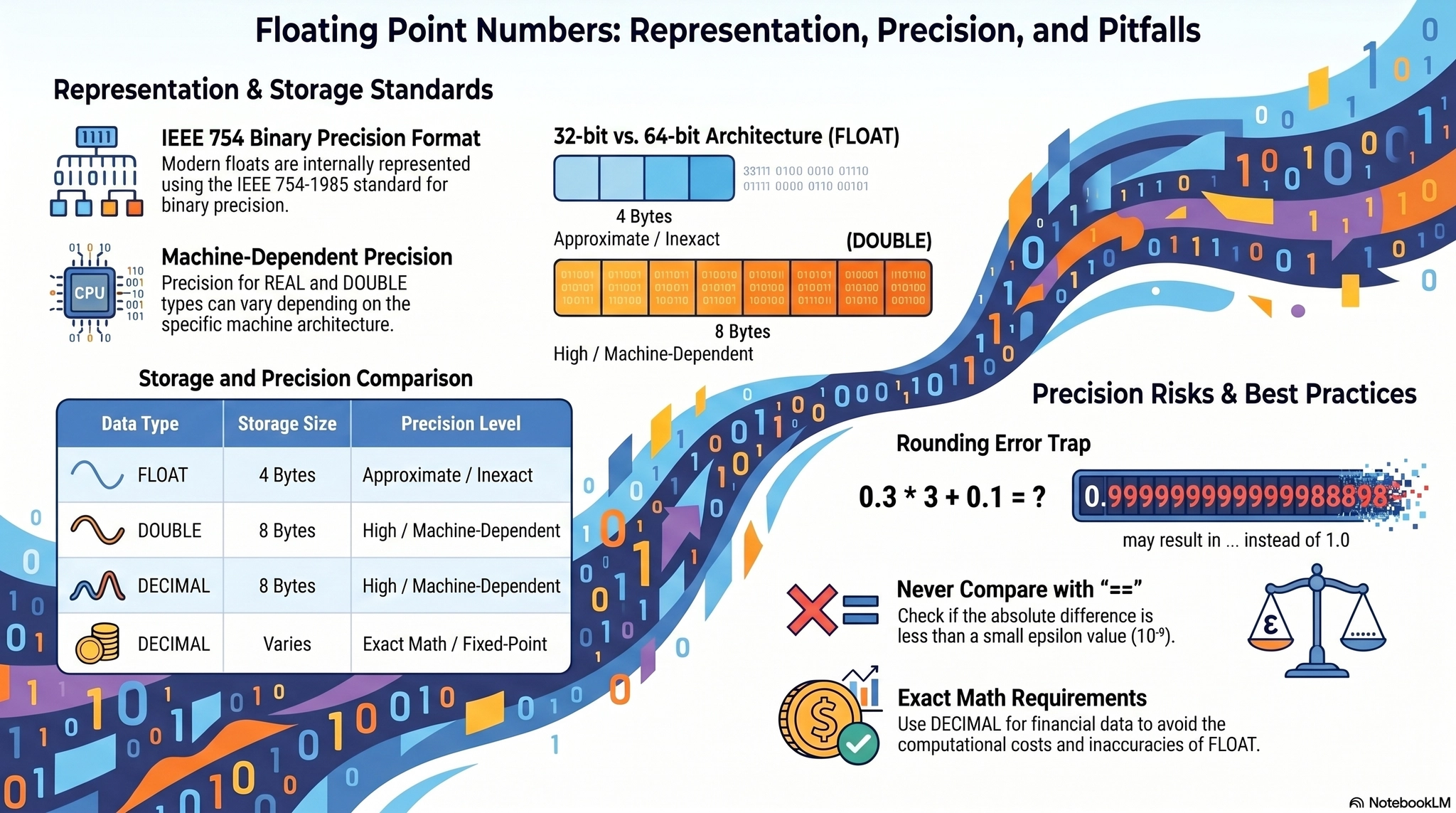
Please note that the provided sources do not contain information regarding the internal architecture of floating-point numbers, the IEEE 754 standard, or components such as the mantissa and exponent. The following comprehensive guide is based entirely on general computer science and software engineering knowledge outside of your given sources. You may want to independently verify this information.
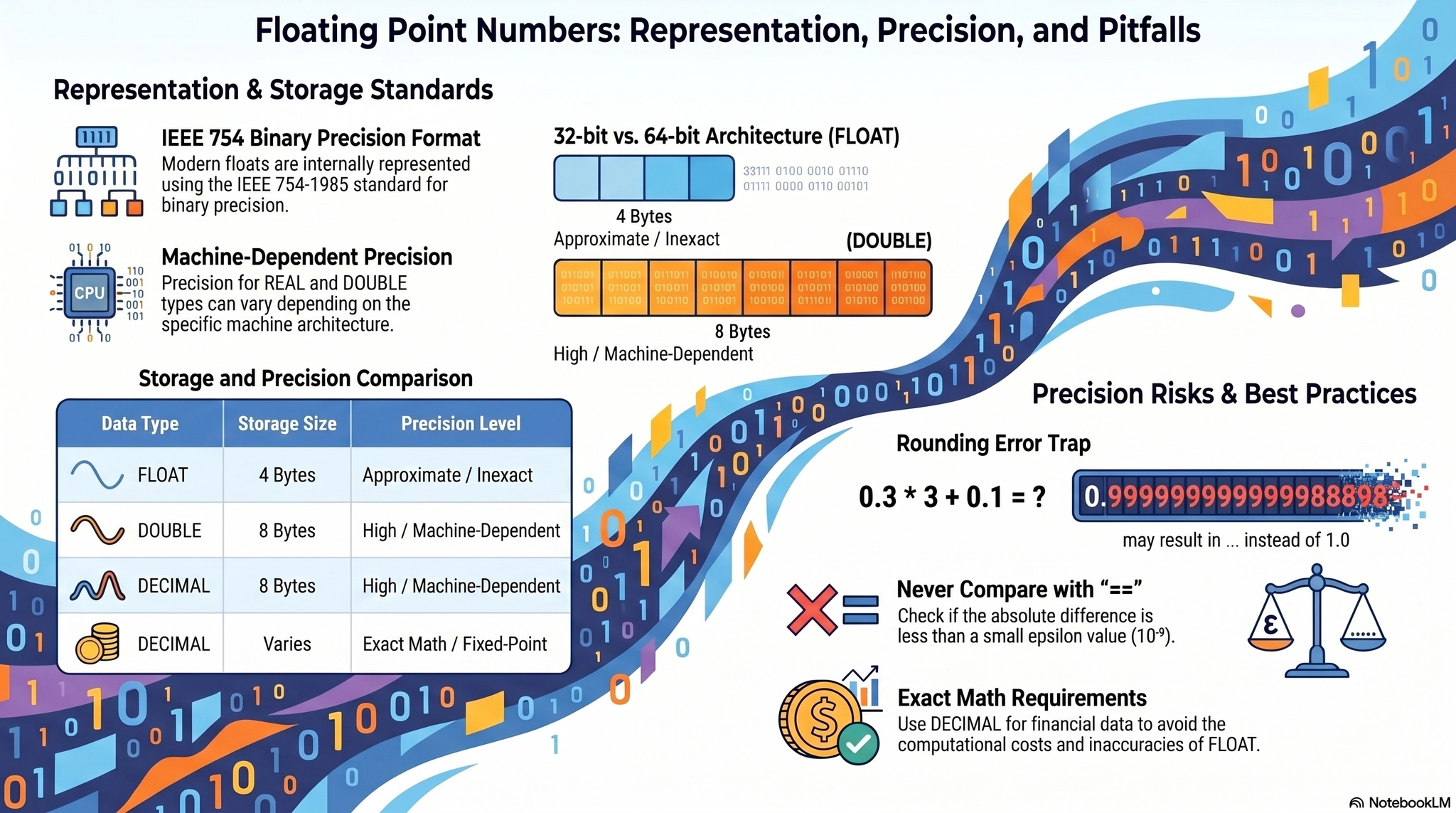
1. Introduction: The Illusion of Exact Mathematics in Computing
Every backend software engineer, regardless of the programming language they use, eventually encounters a seemingly impossible mathematical anomaly. You write a simple script to add two decimal numbers, perhaps representing a financial transaction or a precise scientific measurement. You ask the computer to calculate 0.1 + 0.2. Instead of returning the expected 0.3, the system outputs 0.30000000000000004.
For a junior developer, this behavior often looks like a bug in the compiler or the runtime environment. However, this is not a bug; it is a fundamental characteristic of how modern computer hardware represents continuous real numbers within the strict, discrete confines of binary memory.
The physical memory of a computer is finite, consisting of transistors that can only hold binary states: 0 or 1. However, the set of real numbers in mathematics is infinite. Between the integers 1 and 2, there is an infinite continuum of fractional numbers (1.1, 1.11, 1.111, ad infinitum). To solve the impossible challenge of squeezing an infinite spectrum of continuous numbers into a fixed 32-bit or 64-bit memory register, computer scientists developed floating-point arithmetic.
To truly master backend engineering, database storage optimization, and system architecture, you must thoroughly understand the internal mechanics of floating-point numbers. In this extensive guide, we will mathematically deconstruct the IEEE 754 floating-point standard, isolate its core components—the Sign, the Exponent, and the Mantissa—and explore exactly why precision loss occurs, how to mitigate it, and the architectural trade-offs involved in using floating-point types.
2. The Architectural Foundation: The IEEE 754 Standard
Before 1985, different computer manufacturers implemented fractional arithmetic in entirely different ways. A program calculating physics trajectories on an IBM mainframe would yield different results when executed on a Cray supercomputer. To resolve this chaotic fragmentation, the Institute of Electrical and Electronics Engineers (IEEE) established the IEEE 754 Standard for Floating-Point Arithmetic. Today, virtually every modern CPU and programming language strictly adheres to this hardware standard.
The genius of the IEEE 754 standard lies in its adoption of scientific notation for binary numbers. In decimal scientific notation, we represent massive numbers compactly. Instead of writing 300,000,000, we write . Notice that the decimal point "floats" to rest immediately after the first non-zero digit, accompanied by a base (10) raised to an exponent (8).
The IEEE 754 standard applies this exact concept to base-2 (binary) mathematics. A floating-point number in computer memory does not store a fixed decimal point (which is known as fixed-point arithmetic). Instead, it dynamically shifts the binary point to accommodate either extremely large magnitudes or extremely precise microscopic fractions.
The standard defines multiple precision levels, but the two most ubiquitous in backend engineering are:
1.
Single Precision (Float32): Consumes 32 bits (4 bytes) of memory.
2.
Double Precision (Float64): Consumes 64 bits (8 bytes) of memory.
Regardless of whether it is 32-bit or 64-bit, every floating-point number is structurally partitioned into three distinct binary components: the Sign Bit, the Exponent, and the Mantissa (also formally known as the Significand).
3. Dissecting the Three Components of a Floating-Point Number
To understand how a computer reads a floating-point number, we must analyze its three internal components. The mathematical formula that evaluates these three binary components into a human-readable decimal value is:
Let us explore each of these components in deep detail, using the 32-bit Single Precision format as our primary reference architecture.
3.1 The Sign Bit (1 bit)
The very first bit of a floating-point memory register is the Sign Bit. It acts as a simple boolean flag that determines the mathematical polarity of the entire number.
•
If the Sign Bit is 0, the number is positive.
•
If the Sign Bit is 1, the number is negative.
Because the sign is entirely decoupled from the actual numerical magnitude, floating-point arithmetic possesses a unique hardware quirk: it is possible to represent both positive zero (+0.0) and negative zero (-0.0). While mathematically identical, these two variations exist independently at the silicon level.
3.2 The Exponent and the Concept of Biasing (8 bits)
Following the single sign bit, the next 8 bits (in a 32-bit float) represent the Exponent. The exponent defines the scale or magnitude of the number. It dictates how far the binary point should "float" to the left or to the right.
However, exponents must be able to represent both massive numbers (positive exponents) and microscopic fractions (negative exponents). Instead of using a traditional Two's Complement system to represent negative numbers, the IEEE 754 standard utilizes a technique called Biasing.
In a 32-bit float, the 8-bit exponent can hold integer values ranging from 0 to 255. The standard applies a constant bias of 127 to this value.
•
If the computer wants to represent an exponent of , it stores the value (which is 10000100 in binary).
•
If the computer wants to represent a negative exponent of , it stores the value (which is 01111100 in binary).
By utilizing a bias, the hardware can easily perform rapid comparisons between two floating-point numbers simply by executing a fast integer comparison on the memory bits, avoiding the complexity of interpreting signed negative binary fields.
3.3 The Mantissa / Significand (23 bits)
The remaining 23 bits constitute the Mantissa (also called the fraction or significand). The mantissa is responsible for holding the actual significant digits of the number, determining its ultimate precision.
This is where the most brilliant optimization of the IEEE 754 standard occurs: the Implicit Leading Bit.
In binary scientific notation, a normalized number is always shifted so that exactly one non-zero digit rests to the left of the binary point. Because we are operating in base-2, the only possible non-zero digit is 1.
For example, a binary number like 0.001011 is normalized as .
Because the leading digit before the decimal point in a normalized binary number is always 1, storing it in memory would be a waste of a precious bit. Therefore, the IEEE 754 hardware completely omits the leading 1. The computer implicitly assumes its existence during mathematical operations. The 23 bits of the mantissa only store the fractional data after the decimal point. This clever engineering trick effectively grants a 32-bit float 24 bits of actual precision.
4. A Step-by-Step Mathematical Conversion
To solidify these abstract concepts, let us manually convert the decimal number 0.15625 into its 32-bit IEEE 754 binary representation, exactly as the CPU would perform the operation.
Step 1: Convert the decimal to binary.
We multiply the fraction by 2 to extract the binary digits:
•
(Digit is 0)
•
(Digit is 0)
•
(Digit is 1, remainder is 0.25)
•
(Digit is 0)
•
(Digit is 1, remainder is 0.0)
The exact binary representation of 0.15625 is 0.00101.
Step 2: Normalize the binary number.
We must shift the binary point so that a single 1 appears on the left side.
0.00101 becomes .
Step 3: Extract the components.
•
Sign Bit: The number is positive, so the Sign Bit is 0.
•
Exponent: The true exponent is -3. We add the bias of 127. . The decimal 124 in 8-bit binary is 01111100.
•
Mantissa: We drop the implicit leading 1.. The remaining fraction is 01. We pad the rest of the 23 bits with zeros, resulting in 01000000000000000000000.
Step 4: Concatenate the memory layout.
When assembled in the computer's memory, the 32-bit float for 0.15625 looks like this:
0 | 01111100 | 01000000000000000000000
Because the conversion of this specific fraction terminates cleanly, no precision is lost. The value is mathematically exact. However, this is a rare luxury in floating-point mathematics.
5. The Root Cause of Precision Loss and Rounding Errors
Now that we understand the hardware architecture, we can return to the infamous 0.1 + 0.2 problem. Why does precision loss occur so frequently?
The root cause lies in the incompatibility between base-10 (decimal) fractions and base-2 (binary) fractions. In our human decimal system, a fraction like cannot be represented cleanly; it becomes an infinite repeating sequence: 0.333333.... We must eventually truncate it and accept a tiny loss of accuracy.
The exact same phenomenon occurs in binary. The computer can only neatly represent fractions whose denominators are perfect powers of two (e.g., 1/2, 1/4, 1/8, 1/16). The decimal number 0.1 is equivalent to the fraction . Because 10 is not a perfect power of two, converting it into base-2 results in an infinite, repeating binary sequence.
Let us attempt to convert 0.1 into binary:
•
(0)
•
(0)
•
(0)
•
(1)
•
(1)
•
(0) — The pattern begins repeating here.
The binary representation of 0.1 is 0.00011001100110011... into infinity.
Because the Mantissa only has 23 bits of physical memory (or 52 bits in a Double Precision float), the CPU is forced to forcefully truncate and round this infinite sequence. The moment the infinite sequence is severed and rounded to fit into the memory register, the data is permanently corrupted. The stored number is no longer exactly 0.1; it is an incredibly close approximation, perhaps 0.10000000149011611938.
When you instruct the CPU to add 0.1 and 0.2, you are actually adding two slightly corrupted approximations together. The overlapping rounding errors compound, ultimately bleeding over into the visible decimal output, generating the frustrating 0.30000000000000004 result.
6. Special Floating-Point Values: Infinity, NaN, and Subnormals
The IEEE 754 standard does not merely represent standard numbers; it allocates specific bit patterns in the Exponent and Mantissa to handle edge cases, undefined operations, and hardware limits.
6.1 Infinity and NaN
If the 8-bit Exponent is entirely filled with ones (11111111 or 255), the hardware treats the value as a special marker.
•
Infinity: If the Exponent is 255 and the Mantissa is composed entirely of 0s, the value represents Infinity (e.g., the result of dividing a positive non-zero number by zero).
•
NaN (Not a Number): If the Exponent is 255 and the Mantissa contains any 1s, the value is NaN. NaN is generated when an application attempts an impossible mathematical operation, such as calculating the square root of a negative number, or dividing zero by zero. By design, NaN is extremely aggressive; any mathematical operation involving NaN will immediately output NaN, poisoning the computation chain to alert developers of a critical arithmetic failure.
6.2 Subnormal (Denormalized) Numbers
What happens when a number is so incredibly microscopic that it cannot be normalized? If a number requires a negative exponent that surpasses the hardware limit (e.g., an exponent of -130 in a 32-bit float), it triggers an Underflow.
Instead of aggressively rounding the value to absolute zero, the IEEE 754 standard implements Subnormal Numbers. If the Exponent consists entirely of 0s, the hardware disables the "Implicit Leading 1" rule. The implicit bit becomes 0.. This allows the computer to gracefully represent increasingly microscopic numbers, slowly degrading the precision bit by bit until it finally hits true zero. This mechanism, known as gradual underflow, prevents sudden, catastrophic mathematical crashes in sensitive scientific calculations.
7. Catastrophic Cancellation and the Loss of Associativity
Precision loss is not limited to infinite fractions. In advanced backend algorithms—especially when computing statistics, variances, or physics engines—developers often face a dangerous phenomenon known as Catastrophic Cancellation.
Catastrophic cancellation occurs when you subtract two floating-point numbers that are nearly identical in magnitude.
Imagine two numbers stored with 5 significant digits of precision:
When you subtract , the result is , which is normalized to .
Notice what happened: the calculation wiped out the most significant digits, leaving only a single digit of actual data. The hardware is forced to pad the newly created empty space with artificial zeros. The true precision of the result has been violently destroyed. If this result is subsequently multiplied by a massive number later in the algorithm, the artificially padded zeros will amplify, generating drastically incorrect outputs.
Furthermore, because of rounding errors, floating-point arithmetic is not associative.
In pure mathematics, is always equal to .
In computer science, executing floating-point additions in a different order will yield entirely different results, especially if the numbers differ drastically in magnitude. If you add a microscopic number to a massive number, the microscopic number's mantissa will be shifted so far to the right that it falls entirely off the 23-bit memory register, becoming mathematically erased. To minimize this error, backend developers writing summation loops must sort the data arrays and add the smallest numbers together first before introducing the massive numbers.
8. Engineering Best Practices: How to Tame the Floating Point
Now that we have comprehensively explored the internal hardware mechanics, we must discuss the absolute best practices for dealing with precision loss in production backend environments.
8.1 Never Use Floats for Monetary Values
The single most destructive mistake a junior developer can make is utilizing float or double data types to represent financial currency. Because monetary calculations often involve cents (0.10, 0.20), and because these fractions trigger the infinite binary repetition problem, financial records will inevitably drift over millions of transactions, destroying accounting ledgers.
The Solution: You must completely avoid hardware floating-point registers. Instead, utilize software-based arbitrary-precision libraries. In Java, you must use the java.math.BigDecimal class. BigDecimal does not use IEEE 754 binary fractions; instead, it stores the numerical digits in an internal integer array and explicitly tracks the decimal position. While BigDecimal is significantly slower in CPU processing time than raw hardware floats, it guarantees 100% mathematical perfection for financial software. Alternatively, many database schemas simply store monetary values as raw integers representing the smallest unit (e.g., storing $10.50 as the integer 1050 cents).
8.2 The Epsilon Equality Anti-Pattern
Because rounding errors alter the final bits of the mantissa, you must never use the direct equality operator (==) to compare two calculated floating-point numbers.
// DANGEROUS ANTI-PATTERN
double a = 0.1 + 0.2;
if (a == 0.3) {
System.out.println("Success!"); // This will never execute.
}
Java
복사
The Solution: To compare floating-point numbers safely, you must define a microscopic tolerance threshold known as a Machine Epsilon (). Instead of checking if the variables are exactly identical, you calculate the absolute difference between the two numbers and verify that the difference is smaller than your epsilon.
// CORRECT ENGINEERING PATTERN
double a = 0.1 + 0.2;
double expected = 0.3;
double EPSILON = 1e-9; // The tolerance threshold
if (Math.abs(a - expected) < EPSILON) {
System.out.println("Success! The numbers are mathematically equivalent.");
}
Java
복사
By relying on epsilon comparison, your application gracefully absorbs the invisible hardware-level rounding errors without breaking the overarching business logic.
9. Conclusion and Summary
The concept of floating-point arithmetic is a profound testament to the ingenuity of computer science. The IEEE 754 standard miraculously compresses the infinite spectrum of real mathematical numbers into a finite, highly optimized sequence of 32 or 64 bits.
By structurally separating the number into a Sign Bit, an Exponent with a dedicated bias, and a Mantissa that relies on an implicit leading digit, the CPU achieves extraordinary dynamic range and blistering computational speed. However, this speed comes at the strict cost of precision. Because fractional numbers like 0.1 create infinite repeating loops in base-2 binary, the hardware is forced to sever and round the data, permanently corrupting the exact mathematical value.
As a backend software engineer, it is your responsibility to identify the domains where this precision loss is acceptable (such as video game physics, machine learning weights, or graphical rendering) and the domains where it is absolutely catastrophic (such as financial ledgers or banking transactions). By mastering the underlying silicon architecture and deploying correct engineering mitigations like BigDecimal and Epsilon comparisons, you can prevent insidious data corruption and construct highly reliable, numerically flawless enterprise systems.
