



Introduction: The Black Box of Slow Queries
Every backend developer has experienced this frustrating scenario: your application is performing perfectly in your local development environment, but the moment it is deployed to production, a specific API endpoint slows to a crawl. The web server logs point directly to a database timeout. You look at the SQL query, and it seems perfectly logical. Perhaps you add an index blindly, hoping it will act as a magic bullet, but the query remains painfully slow.
Why does this happen? The primary issue is that most developers treat the relational database as a black box. They send a declarative SQL string into the void and patiently wait for a result set to return, entirely unaware of the monumental mathematical and computational effort occurring beneath the surface. To truly master database performance optimization, you must peer inside this black box.
In PostgreSQL, the flashlight that illuminates the dark corners of database execution is the EXPLAIN ANALYZE command. However, generating an execution plan is only half the battle; knowing how to read, interpret, and act upon its cryptic output is a rare and highly valuable engineering skill. In this comprehensive guide, we will systematically decode the output of PostgreSQL's EXPLAIN ANALYZE. We will explore the mathematical foundations of the query optimizer, reproduce real-world performance bottlenecks like massive sequential scans and disk-based sorting, and teach you exactly where to look when your query is failing.
The Foundation: How the Query Optimizer Works
Before we can read an execution plan, we must understand the system that generates it: the Query Optimizer.
Unlike procedural programming languages where you explicitly tell the computer how to loop through arrays and variables, SQL is a declarative language. You tell the database what data you want, and the database engine decides the most efficient algorithmic path to retrieve it [1].
When you submit a query to PostgreSQL, it passes through several stages. First, the parser checks the syntax. Then, the rewrite system applies any necessary rule transformations (such as expanding database views). Finally, the query reaches the optimizer. The optimizer's job is to generate multiple logically equivalent query-evaluation plans, estimate the computational cost of each plan, and select the one with the lowest overall cost [2].
To estimate these costs, the optimizer relies heavily on database statistics. The database continually monitors the distribution of data within your tables, tracking the number of distinct values, the most frequent values, and the correlation between columns. Based on these statistics, the optimizer calculates the estimated cost of various access paths (e.g., whether to read the table sequentially or traverse a B-Tree index) and join algorithms (e.g., whether to use a nested loop or a hash join).
EXPLAIN vs. EXPLAIN ANALYZE: Theory vs. Reality
PostgreSQL provides two primary commands to inspect the optimizer's decisions:
1.
EXPLAIN: This command asks the database, "If I were to run this query, what is your best guess on how you would execute it, and how much do you think it will cost?" It returns the estimated execution plan without actually running the query.
2.
EXPLAIN ANALYZE: This command actually executes the query, measures the precise timing and row counts at every single step, and displays these actual metrics alongside the original estimates.
While EXPLAIN is useful for checking if an index might be used without locking up your server with a massive query, EXPLAIN ANALYZE is strictly necessary for debugging performance. The optimizer is highly intelligent, but it is not infallible. Stale statistics can cause the optimizer to severely underestimate the number of rows a condition will return, leading it to choose a disastrously inefficient execution plan. EXPLAIN ANALYZE exposes the exact discrepancies between the database's mathematical estimates and reality.
Anatomy of a PostgreSQL Execution Plan
When you run EXPLAIN ANALYZE, PostgreSQL returns a textual representation of a node tree. Every operation the database performs—such as scanning a table, filtering rows, sorting data, or joining tables—is represented as a distinct "Node."
Reading the Tree Structure
The most crucial rule for reading a query execution plan is understanding its execution order: You must read the plan from the inside out, and from the bottom up.
Consider the following hierarchical pseudo-plan:
-> Hash Join
-> Seq Scan on users
-> Hash
-> Seq Scan on orders
Plain Text
복사
In this structure, the deepest indented nodes execute first. The database will first execute the Seq Scan on orders, pass that data up into the Hash node to build an in-memory hash table, and only then perform the Seq Scan on users to probe against that hash table in the final Hash Join node.
Deciphering the Core Metrics
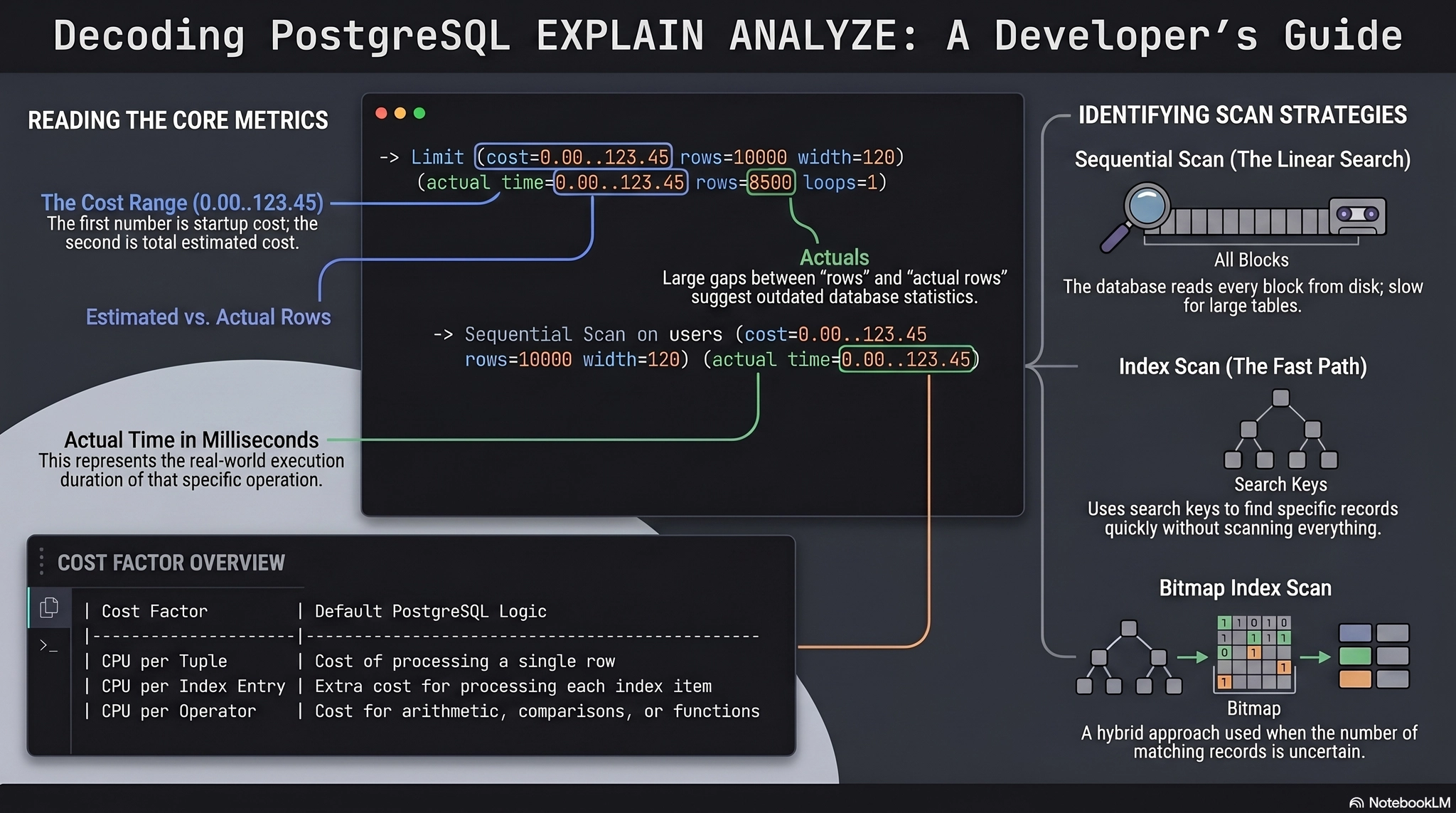
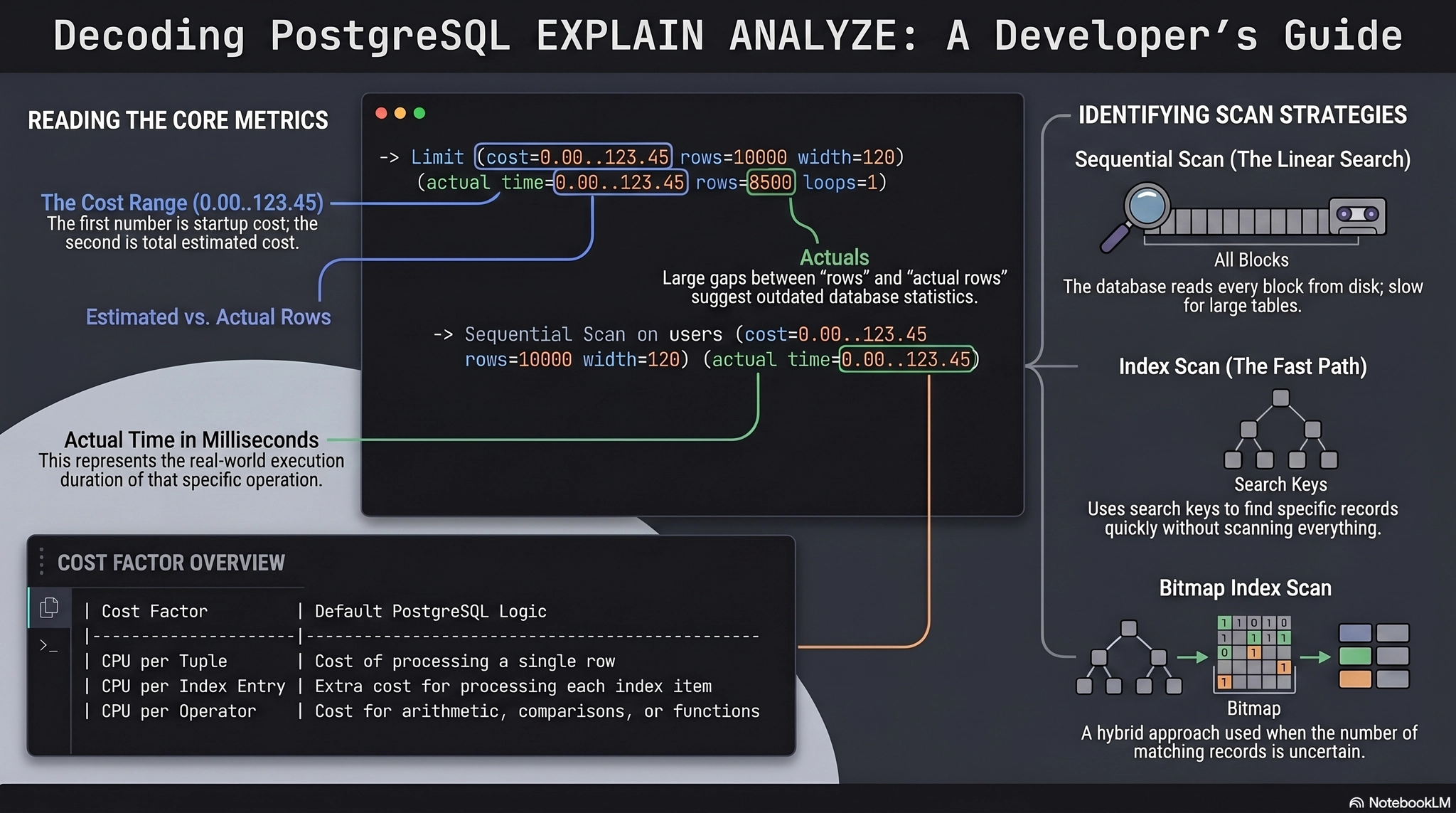
Let us examine a single node from a real EXPLAIN ANALYZE output to understand the metrics provided:
-> Seq Scan on employees (cost=0.00..14.50 rows=500 width=36) (actual time=0.015..0.080 rows=480 loops=1)
Filter: (department = 'Engineering')
Rows Removed by Filter: 520
Plain Text
복사
This single line contains a wealth of diagnostic information. Let us break it down systematically:
•
`Seq Scan on employees`: This identifies the physical operation (a Sequential Scan) and the target object (the employees table).
•
`cost=0.00..14.50`: These are the optimizer's mathematical estimates. The first number (0.00) is the Startup Cost—the theoretical cost required before the node can return its very first row. The second number (14.50) is the Total Cost—the estimated cost to return all rows. Cost is an arbitrary unit primarily based on the estimated number of disk page fetches and CPU cycles.
•
`rows=500`: The optimizer's estimate of how many rows this node will output.
•
`width=36`: The estimated average size (in bytes) of the rows output by this node.
•
`actual time=0.015..0.080`: The real-world measurements in milliseconds. 0.015 ms was the time to fetch the first row, and 0.080 ms was the total execution time for this specific node.
•
`rows=480`: The actual number of rows returned by the node during execution. Notice how close it is to the estimated 500. If these numbers diverge massively (e.g., estimated 5, actual 5,000,000), you have found a statistics failure.
•
`loops=1`: This is the most dangerous and misunderstood metric in the entire output. This indicates how many times this specific node was executed. To calculate the true total time spent in a node, you must mathematically multiply the actual total time by the loops value. If a node takes 0.5ms but loops 10,000 times, it is consuming 5 full seconds of your query execution!
Practical Scenario 1: The Dreaded Sequential Scan
Now that we understand the vocabulary, let us put it into practice. A junior developer complains that fetching a user's profile is taking over a second.
We run the query:
EXPLAIN ANALYZE
SELECT id, username, email
FROM users
WHERE email = 'alex@example.com';
Plain Text
복사
And we receive the following output:
Seq Scan on users (cost=0.00..25820.00 rows=1 width=45) (actual time=650.120..1120.450 rows=1 loops=1)
Filter: ((email)::text = 'alex@example.com'::text)
Rows Removed by Filter: 999999
Planning Time: 0.150 ms
Execution Time: 1120.500 ms
Plain Text
복사
How to read this bottleneck:
Look immediately at the node type: Seq Scan. A Sequential Scan means the database engine is starting at the very first block of the table on the physical hard drive and reading every single block, row by row, until it reaches the end of the table.
Next, look at the Rows Removed by Filter metric. The database had to load 1,000,000 rows from the physical disk into the buffer cache, evaluate the WHERE clause against every single one of them, discard 999,999 of them, and return exactly 1 row.
This is the definition of severe disk I/O waste. In database architecture, disk I/O is notoriously the slowest operation a computer can perform [3]. The CPU can process millions of instructions in the time it takes the mechanical arm of a hard drive (or even the flash controller of an SSD) to locate and transfer a block of data [4]. Are you asking the database to examine massive amounts of data just to throw it away? [5] Yes, you are.
The Solution:
We must provide the database with a highly optimized data structure to locate the email address directly without scanning the table. We add a B-Tree index on the email column.
CREATE INDEX idx_users_email ON users(email);
Plain Text
복사
When we rerun EXPLAIN ANALYZE, the plan changes drastically:
Index Scan using idx_users_email on users (cost=0.42..8.44 rows=1 width=45) (actual time=0.035..0.036 rows=1 loops=1)
Index Cond: ((email)::text = 'alex@example.com'::text)
Planning Time: 0.200 ms
Execution Time: 0.055 ms
Plain Text
복사
The execution time drops from 1120ms to 0.055ms. The database traverses the B-Tree index structure (which operates in O(log N) logarithmic time), locates the exact disk pointer for the requested email, and performs a single random I/O read to fetch the row from the table heap [6].
Practical Scenario 2: Uncovering Join Algorithms
Performance issues rarely stem from single-table queries. Modern relational applications require joining multiple normalized tables. The PostgreSQL optimizer has several algorithms to execute joins, and understanding them is critical for reading execution plans.
Let us analyze a slow query retrieving all orders for users in a specific city:
EXPLAIN ANALYZE
SELECT u.username, o.total_amount
FROM users u
JOIN orders o ON u.id = o.user_id
WHERE u.city = 'London';
Plain Text
복사
The Nested Loop Join (The Silent Killer)
If the tables are missing proper foreign key indexes, you might see this disastrous execution plan:
-> Nested Loop (cost=0.00..550000.00 rows=5000 width=32) (actual time=0.500..8500.000 rows=5000 loops=1)
-> Seq Scan on users u (cost=0.00..150.00 rows=1000 width=20) (actual time=0.010..5.000 rows=1000 loops=1)
Filter: (city = 'London')
-> Seq Scan on orders o (cost=0.00..500.00 rows=5 width=20) (actual time=0.005..8.400 rows=5 loops=1000)
Filter: (user_id = u.id)
Plain Text
복사
How to read this bottleneck:
We read bottom-up. First, the database performs a sequential scan on the users table to find all users in London. It finds 1,000 users.
Then, it passes these rows to the Nested Loop node. A Nested Loop behaves exactly like a for loop inside another for loop in application code. For every single row returned by the outer loop (the users), the database must completely execute the inner loop (the orders).
Look carefully at the loops=1000 metric on the inner Seq Scan on orders node. The actual time is 8.400 ms. Because the loop executes 1,000 times, the total time spent scanning the orders table is mathematically calculated as 8.400 ms * 1000 loops = 8,400 ms (8.4 seconds)! The time complexity of a nested loop is O(N * M), making it disastrously non-scalable for large datasets unless the inner loop is supported by a highly efficient index scan [7].
The Hash Join (The Scalable Solution)
By adding an index on orders(user_id), or if the optimizer correctly identifies that both tables are large, PostgreSQL will switch to a much more efficient algorithm: the Hash Join.
-> Hash Join (cost=350.00..1500.00 rows=5000 width=32) (actual time=10.000..45.000 rows=5000 loops=1)
Hash Cond: (o.user_id = u.id)
-> Seq Scan on orders o ...
-> Hash (cost=150.00..150.00 rows=1000 width=20) (actual time=8.000..8.000 rows=1000 loops=1)
Buckets: 1024 Batches: 1 Memory Usage: 64kB
-> Seq Scan on users u ...
Filter: (city = 'London')
Plain Text
복사
How to read this improvement:
A Hash Join dramatically reduces time complexity from O(N * M) to O(N + M).
Reading bottom-up, the database first scans the users table and feeds the results into the Hash node. This node builds an in-memory hash table using the u.id as the key. Notice the Memory Usage: 64kB metric—this confirms the entire hash table fit perfectly into the server's working memory.
Once the hash table is built, the database sequentially scans the orders table exactly once. For each order, it applies a hashing function to o.user_id and instantly probes the in-memory hash table to find matching users. The query time drops from 8.5 seconds to 45 milliseconds.
Practical Scenario 3: Memory, Sorting, and Disk I/O
One of the most elusive performance killers in PostgreSQL is related to sorting operations. Developers frequently append an ORDER BY clause to their queries without realizing the immense computational burden it places on the database architecture.
Consider an API endpoint that fetches recent transactions, sorted by date:
EXPLAIN ANALYZE
SELECT id, transaction_date, amount
FROM transactions
ORDER BY transaction_date DESC;
Plain Text
복사
-> Sort (cost=15000.00..15500.00 rows=500000 width=24) (actual time=1200.000..1450.000 rows=500000 loops=1)
Sort Key: transaction_date DESC
Sort Method: external merge Disk: 45000kB
-> Seq Scan on transactions ...
Plain Text
복사
How to read this bottleneck:
The execution plan reveals a massive red flag that every database administrator fears: Sort Method: external merge Disk: 45000kB.
When PostgreSQL needs to sort data, it attempts to perform the sort entirely within high-speed RAM using a quicksort algorithm. The maximum amount of memory a single query node is allowed to use for sorting and hashing is governed by the work_mem configuration parameter (which usually defaults to a highly conservative 4MB).
In this plan, the database needed to sort 500,000 rows, which required roughly 45MB of memory space. Because 45MB vastly exceeds the default 4MB work_mem limit, the database was forced to abort the in-memory quicksort. Instead, it divided the data into chunks, sorted each chunk in memory, and wrote the intermediate sorted chunks down to the physical hard drive (creating temporary files). Finally, it performed an "external merge" of those temporary files back off the disk to produce the final result.
Writing to and reading from temporary disk files during query execution introduces catastrophic disk I/O latency, destroying your API's performance.
The Solution:
There are two primary ways to resolve a disk-based sort bottleneck.
1.
System Configuration: If your server has abundant RAM, you can increase the work_mem setting either globally or locally for the specific session running the heavy report:
SET work_mem = '64MB';
If you rerun the query after increasing the memory budget, the execution plan will triumphantly report:
Sort Method: quicksort Memory: 45000kB
By keeping the operation entirely within the CPU's working memory, execution time will plummet.
1.
Index-Driven Sorting: The most scalable architectural solution is to completely eliminate the need for the database to perform a sort at runtime. If you create a B-Tree index on the transaction_date column, the data is structurally maintained in a sorted order on the disk [8]. When you query with ORDER BY transaction_date DESC, the optimizer will intelligently choose an Index Scan Backward. It simply reads the index from the bottom up, completely bypassing the Sort node and streaming the results instantly to the client.
Conclusion and Summary
The ability to read and interpret PostgreSQL's EXPLAIN ANALYZE output is the demarcation line between a developer who guesses at performance problems and an engineer who scientifically resolves them. By mastering the execution plan, you transform the database from an unpredictable black box into a transparent, strictly logical system.
Whenever you encounter a slow query, remember this analytical checklist:
•
Always use EXPLAIN ANALYZE to compare the optimizer's theoretical cost estimates with the actual execution reality.
•
Read the plan structurally from the inside out and bottom up to understand the flow of data.
•
Identify massive Seq Scan nodes accompanied by high Rows Removed by Filter metrics; these indicate severe disk I/O waste that can be resolved with targeted B-Tree indexes.
•
Always multiply the actual time by the loops value to discover hidden bottlenecks within Nested Loop joins.
•
Hunt down Sort Method: external merge Disk warnings, and aggressively optimize them by increasing work_mem or leveraging covering indexes to provide pre-sorted data paths.
Stop guessing why your APIs are timing out. Use the execution plan to understand the database's mathematical decisions, eliminate unnecessary disk operations, and architect applications that scale flawlessly under the heaviest of operational workloads.
References
[1] Database-System-Concepts-7th-Edition — Database languages ° Data-definition language ° Data-manipulation language ⋄ Procedural DML ⋄ Declarative DML ⋄ nonprocedural DML ° Query language Data-definition language ° Domain Constraints ° Referential Integrity ° Authorization ⋄ Read authorization ⋄ Insert authorization ⋄ Update authorization …
[2] Database-System-Concepts-7th-Edition — Regardless of the way the query is written, it is the job of the optimizer to find the least-cost plan for the query. To find the least costly query-evaluation plan, the optimizer needs to generate al-ternative plans that produce the same result as the given expression and to choose the least costly…
[3] Database-System-Concepts-7th-Edition — 12.12 What is scrubbing, in the context of RAID systems, and why is scrubbing im-portant? 12.13 Suppose you have data that should not be lost on disk failure, and the applica-tion is write-intensive. How would you store the data? Further Reading [Hennessy et al. (2017)] is a popular textbook on comp…
[4] Database-System-Concepts-7th-Edition — Review Terms Database-management system (DBMS) Database-system applications Online transaction processing Data analytics File-processing systems Data inconsistency Consistency constraints Data abstraction ° Physical level ° Logical level ° View level Instance Schema ° Physical schema ° Logical schem…
[5] O'Reilly.High.Performance.MySQL.3rd.Edition.Mar.2012 (1) — An Indexing Case Study 189 Supporting Many Kinds of Filtering 190 Avoiding Multiple Range Conditions 192 Optimizing Sorts 193 Index and Table Maintenance 194 Finding and Repairing Table Corruption 194 Updating Index Statistics 195 Reducing Index and Data Fragmentation 197 Summary 199 Table of Conten…
[6] Database-System-Concepts-7th-Edition — Practice Exercises 679 ° Nonleaf nodes ° Internal nodes ° Range queries ° Node split ° Node coalesce ° Redistribute of pointers ° Uniquifier B+-tree extensions ° Prefix compression ° Bulk loading ° Bottom-up B+-tree construction B-tree indices Hash file organization ° Hash function ° Bucket ° Overfl…
[7] Database-System-Concepts-7th-Edition — ° Dynamic-programming algorithm ° Left-deep join order ° Interesting sort order Heuristic optimization Plan caching Access-plan selection Practice Exercises 789 Correlated evaluation Decorrelation Semijoin Anti-semijoin Materialized views Materialized view maintenance ° Recomputation ° Incremental m…
[8] O'Reilly.High.Performance.MySQL.3rd.Edition.Mar.2012 (1) — 12. If you need to sort in different directions, a trick that sometimes helps is to store a reversed or negated value. 182 | Chapter 5: Indexing for High Performance UNIQUE KEY rental_date (rental_date,inventory_id,customer_id), KEY idx_fk_inventory_id (inventory_id), KEY idx_fk_customer_id (c…
